What Is Node and When Should I Use It?
There are plenty of definitions to be found online. Let’s take a look at a couple of the more popular ones. This is what the project’s home page has to say:
Node.js® is a JavaScript runtime built on Chrome’s V8 JavaScript engine.
And this is what Stack Overflow has to offer:
Node.js is an event-based, non-blocking, asynchronous I/O runtime that uses Google’s V8 JavaScript engine and libuv library.
Node Is Built on Google Chrome’s V8 JavaScript Engine
Node Binaries vs Version Manager
Many websites will recommend that you head to the official Node download page and grab the Node binaries for your system. While that works, I would suggest that you use a version manager instead. This is a program that allows you to install multiple versions of Node and switch between them at will. There are various advantages to using a version manager. For example, it negates potential permission issues when using Node with npm and lets you set a Node version on a per-project basis.
Node.js Has Excellent Support for Modern JavaScript
As can be seen on this compatibility table, Node has excellent support for ECMAScript 2015 (ES6) and beyond. As you’re only targeting one runtime (a specific version of the V8 engine), this means that you can write your JavaScript using the latest and most modern syntax. It also means that you don’t generally have to worry about compatibility issues — as you would if you were writing JavaScript that would run in different browsers.
Introducing npm, the JavaScript Package Manager
As I mentioned earlier, Node comes bundled with a package manager called npm. To check which version you have installed on your system, type npm -v.
In addition to being the package manager for JavaScript, npm is also the world’s largest software registry. There are over 1,000,000 packages of JavaScript code available to download, with billions of downloads per week. Let’s take a quick look at how we would use npm to install a package.
What Is Node.js Used For?
Node.js Lets Us Run JavaScript on the Server
Next we come to one of the biggest use cases for Node.js — running JavaScript on the server. This isn’t a new concept, and was first attempted by Netscape way back in 1994. Node.js, however, is the first implementation to gain any real traction, and it provides some unique benefits, compared to traditional languages. Node now plays a critical role in the technology stack of many high-profile companies. Let’s have a look at what those benefits are.
The Node.js Execution Model
In very simplistic terms, when you connect to a traditional server, such as Apache, it will spawn a new thread to handle the request. In a language such as PHP or Ruby, any subsequent I/O operations (for example, interacting with a database) block the execution of your code until the operation has completed. That is, the server has to wait for the database lookup to complete before it can move on to processing the result. If new requests come in while this is happening, the server will spawn new threads to deal with them. This is potentially inefficient, as a large number of threads can cause a system to become sluggish — and, in the worst case, for the site to go down. The most common way to support more connections is to add more servers.
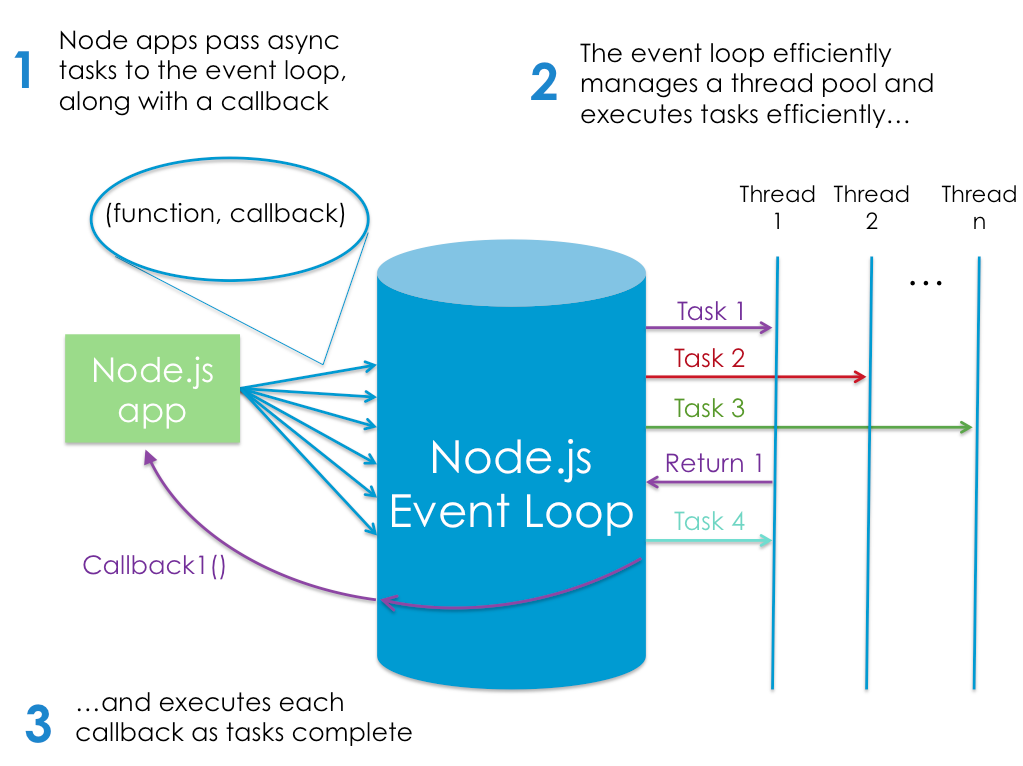
Node.js, however, is single-threaded. It’s also event-driven, which means that everything that happens in Node is in reaction to an event. For example, when a new request comes in (one kind of event) the server will start processing it. If it then encounters a blocking I/O operation, instead of waiting for this to complete, it will register a callback before continuing to process the next event. When the I/O operation has finished (another kind of event), the server will execute the callback and continue working on the original request. Under the hood, Node uses the libuv library to implement this asynchronous (that is, non-blocking) behavior.
The following image depicts Node’s execution model:
6 Reasons for Pair Programming
Iterative loops. Code reviews. Fast feedback. Error checking and linting. These are software engineering practices that have proven to dramatically improve the quality of code developers produce. What if you can could get all of this, instantaneously, while typing code line by line and character by character? You can, with pair programming, a technique common to many agile work environments.
More “two heads are better than one” than “stop reading over my shoulder,” pair programming is the practice of two developers sharing a single workstation to interactively tackle a coding task together. At Code Fellows, pair programing is one way we foster a collaborative environment while developing key industry skills.
Why pair program?
- Greater efficiency
- Engaged collaboration
- Learning from fellow students
- Social skills
- Job interview readiness
- Work environment readiness